
Ask Claude or ChatGPT about your eSewa, Khalti, and Fonepay payments
See what was paid, compare provider performance, create payment links, and investigate failures without opening the dashboard. Your money still settles to your own provider accounts, and access is read-only until you choose otherwise.
Things you can ask it
In your own words. The assistant picks the tools, and anything that moves money asks you first.
Show today's successful payments across eSewa, Khalti, and Fonepay.
Compare payment volume and success rate by provider for the last 30 days.
Which payments failed this week, and why?
Create a payment link for Rs 2,500 titled 'Course access, December batch'.
Which checkout sessions were started but never paid?
Show recent refunds and where each one stands.
Already collecting on a QR? Keep it.
Your QR collects the payment. Your assistant helps you understand and manage the payments that came in across the providers you have connected: which ones succeeded, which failed, what to send a customer who wants to pay by link. Nothing about how you get paid changes.
Connect in a minute
Hosted for Claude and ChatGPT, local for your editor. Same tools; you choose where the credential lives.
- 1Add the URL in Settings → Connectors.
- 2Sign in to PayBridgeNP.
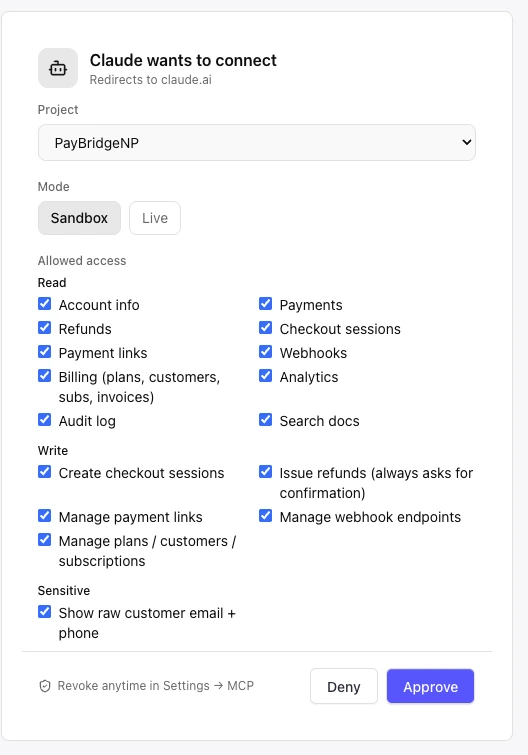
- 3Choose the project, mode and access, then approve.
Read-only by default; write access is opt-in on the consent screen. Confirm-first actions and spend caps need the local server for now.
Local server
Pick your editor
{
  "mcpServers": {
    "paybridge": {
      "command": "npx",
      "args": ["-y", "@paybridge-np/mcp@latest"],
      "env": { "PAYBRIDGENP_API_KEY": "sk_live_..." }
    }
  }
}
Generate a scoped MCP token at dashboard.paybridgenp.com/mcp, not a REST key. Start with sk_test_ in sandbox. Needs Node.js 18 or newer.
For developers: 70 typed tools (33 read, 37 write), 6 prompt templates, per-token rate limits, MIT, open source. Webhook debugging lives here too: "Show failed webhook deliveries from yesterday." Tool reference, scopes, and rate limits in the docs.
Six controls between the assistant and your money
Read-only by default. Everything else is opt-in, capped, confirmed, or logged.
- Scoped tokens
- 16 scopes in Read, Write, and Sensitive groups. Read-only by default; customer PII stays masked unless you grant pii:read.
- Confirmation before money moves
- Refunds, checkout sessions above Rs 5,000, and hard deletes ask you first. Local server today; a client that cannot ask fails closed.
- Spend cap and rate limits
- An optional rolling 24-hour cap on refunds plus checkouts per local token (the dashboard suggests Rs 50,000), and per-token rate limits on the payment tools, tightest on the money-moving ones.
- Audit trail
- Each call is logged against your account with the token and client that made it, in your dashboard, where one click revokes the token.
- No credential passthrough
- The model sees tool definitions and JSON results. Your eSewa, Khalti, and Fonepay credentials never leave our servers.
- Untrusted-input fencing
- Customer-written text (names, descriptions, metadata) is fenced as untrusted data and stripped of zero-width characters. We do not claim to detect prompt injection.
Questions we get a lot
What's the Model Context Protocol?
An open standard for how AI assistants call external tools. Any MCP client can call PayBridgeNP's tools by name and get JSON back. Spec at modelcontextprotocol.io.
Where does the token live?
Hosted: there is no token to copy; you approve on a PayBridgeNP consent screen and can revoke the app from the dashboard. Local: the token sits in your assistant's config on your machine and a local Node process makes the HTTPS calls. Either way the model only sees tool definitions and results, never the credential.
Does the AI see my customers' email addresses?
Only if you grant the pii:read scope. By default emails are masked (ra***@example.com) and phones show the last 4 digits. Use an MCP token from the dashboard, not a full-access REST key.
Can I have separate tokens for separate assistants?
Yes, and it is the recommended pattern: one token per client, each with the minimum scopes and an expiry (7, 30, or 90 days). The audit log tags every call with the token and client, so an odd call stands out.
Open source
Connect an assistant, ask it something
Read access on every plan, writes opt-in per category, one click to revoke.