
An eSewa or Khalti integration tends to fail in a handful of ways, and each provider has a short list of statuses and errors that tell you which. This page puts them in one place: what each means, what it means for the order in front of you, and what to change.
Last verified: 25 October 2026, against eSewa's ePay docs and Khalti's ePayment docs, plus the eSewa and Khalti integrations PayBridgeNP runs in production. The causes listed come from the providers' docs and from running these integrations.
The golden rule
An error or an unclear status is not the same as "the customer did not pay". Only two answers are final:
- Paid: eSewa
COMPLETE, or KhaltiCompletedwithrefunded: falseand the right amount. - Not paid, for that attempt: eSewa
NOT_FOUNDorCANCELEDafter you have ruled out your own mistakes, or KhaltiExpiredorUser canceled. Record it against the attempt, not the order: a newer attempt for the same order can still be paid.
Everything else, including timeouts and server errors, means "not known yet": keep the order pending and check again.
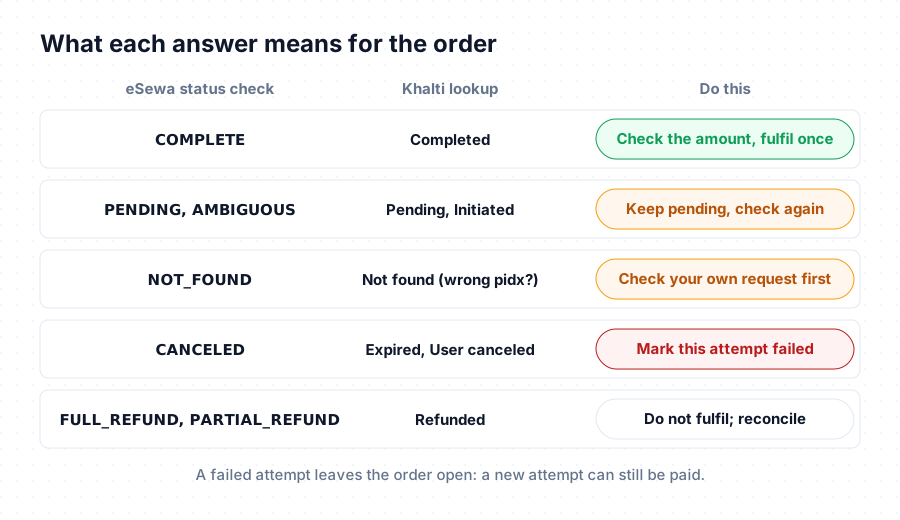
eSewa status check results
These come back from eSewa's status check (/api/epay/transaction/status/), which you call with the product code, transaction_uuid and total_amount.
| Status | eSewa's meaning | What it means for the order | What to do |
|---|---|---|---|
COMPLETE | Successful payment | Paid | Check the amount, fulfil once, store ref_id |
PENDING | Initiated but not completed | Not finished | Keep pending, check again later |
AMBIGUOUS | Payment is in a halted state | Not known | Keep pending and check again |
NOT_FOUND | Terminated at eSewa, session expired | Usually not paid, but see below | Rule out your own mistakes first |
CANCELED | Cancelled or reversed by eSewa | This attempt is not paid | Mark the attempt failed |
FULL_REFUND | Refunded in full | Refunded | Do not fulfil |
PARTIAL_REFUND | Partly refunded | Partly refunded | Reconcile the amount |
Service is currently unavailable (no status) | Server connection timeout | Not known | Retry later |
A few notes on that table. Failures are recorded on the attempt, not the order, so a newer attempt for the same order can still be paid. If AMBIGUOUS does not clear, contact eSewa. If a refund arrives for an order you already fulfilled, reverse the fulfilment. And the "service unavailable" answer comes back as {"code": 0, "error_message": "Service is currently unavailable"} with no status at all: never fail an order on it.
Why eSewa says NOT_FOUND for a payment that went through
Before you treat it as an unpaid order, rule out the request itself:
- The amount is written differently. Use the exact
total_amountstring you put in the form. Sending100when the form said100.00, or an amount in paisa, risksNOT_FOUND. - The wrong
transaction_uuid. For example a new UUID generated on retry, while the customer paid the first one. - Mixed environments. Asking the test server about a live payment, or the reverse, or using
EPAYTESTwith a live merchant's payment.
Once those are ruled out, NOT_FOUND means the session expired unpaid, which is how eSewa describes it.
eSewa form and return problems
eSewa's payment page does not return documented error codes for a bad form, so these show up as symptoms:
| Symptom | Likely cause |
|---|---|
| eSewa's page refuses the payment straight away | The signature does not match (see below) |
| Every attempt fails after a retry worked once | A reused transaction_uuid. Each attempt needs a new one, made of letters, numbers and hyphens only |
The return arrives with no data | The customer cancelled, or the payment failed or is still pending, on eSewa's page |
The data signature does not verify | Wrong secret, or the fields in the wrong order |
On the way in, a mismatch usually means the wrong secret key, fields signed in a different order from signed_field_names, or an amount formatted differently from the one you signed. On the way back, build the message from eSewa's response field list in the documented order.
One more thing worth knowing: the amount inside eSewa's success response can be formatted differently from what you sent (eSewa's own example shows "1,000.0"). Use it only for checking the signature, and take the amount from your own order.
Khalti lookup results
These come back from Khalti's lookup (/epayment/lookup/), which you call with the pidx.
| Status | HTTP | What it means for the order | What to do |
|---|---|---|---|
Completed | 200 | Paid, unless refunded is true | Check total_amount, fulfil once, store transaction_id |
Pending | 200 | Not finished | Keep pending, check again later |
Initiated | 200 | The customer has not paid yet | Keep pending until it completes or expires |
Refunded / Partially Refunded | 200 | Refunded | Do not fulfil |
Expired | 400 | This payment link ran out unpaid | Mark the attempt failed |
User canceled | 400 | The customer cancelled this attempt | Mark the attempt failed |
As with eSewa, a failed or expired attempt leaves the order open for another attempt, and refunds are reconciled rather than fulfilled.
Note that Expired and User canceled come back as HTTP 400. If your code treats every 400 as an error and stops, it will never record them as failed.
Khalti errors
Validation errors on initiate
Khalti answers a bad initiate request with "error_key": "validation_error" and the field that failed:
| Field | Khalti's message | Fix |
|---|---|---|
amount | "Amount should be greater than Rs. 10, that is 1000 paisa." | Send paisa, at least 1000. 100 means Rs 1 |
amount | "A valid integer is required." | Send a whole number of paisa, not "100.00" |
return_url / website_url | "This field may not be blank." | Always send both, even for payment links and invoices |
return_url / website_url | "Enter a valid URL." | Full, absolute URLs (use https:// in production) |
purchase_order_id / purchase_order_name | "This field may not be blank." | Send both, short and non-empty |
amount | "Amount Breakdown mismatch." | If you send amount_breakdown, its parts must add up to amount |
Authentication errors
| Khalti's message | Cause | Fix |
|---|---|---|
| "Invalid token." (401) | Wrong secret key, or a sandbox key used against the live API (or the reverse) | Use the key that matches the base URL |
| "Authentication credentials were not provided." (401) | The Authorization header is missing the word Key | Authorization: Key <secret>, not Bearer |
Lookup errors
| Khalti's message | Cause | Fix |
|---|---|---|
| "Not found." | The pidx is wrong, or from the other environment | Look up the pidx you stored for the order. It does not mean the payment failed |
Problems you will meet in testing
Some errors come up mainly in the sandboxes:
- Khalti "insufficient balance": the shared test wallet you used has run low. Try another test ID: Khalti test credentials.
- Khalti "similar request already being processed": an earlier request for the same payment is still open. Wait for it to finish or expire, and look it up before you try again.
- eSewa test page not loading: the sandbox is down or slow. Wait before you change code: eSewa test credentials.
One set of errors instead of two
With PayBridgeNP, the eSewa and Khalti statuses above are handled for you: amounts are formatted per provider, a payment is only confirmed after the provider says so, and your code gets one signed payment.succeeded webhook. When something is wrong with a request, the API answers in one consistent format with a stable code you can branch on, documented in the API errors reference. Payments settle straight into your own merchant accounts.
Next Steps
- Full integration guides: eSewa API and Khalti API.
- In your stack: Laravel, Node.js and Next.js.
- Confirm payments safely: verify payments with webhooks.