
Can you integrate eSewa in React? Not in React alone. Both eSewa and Khalti need a secret key, and anything in a React bundle is public. The payment has to start and be confirmed on a server. In a Next.js app that server is right there, in route handlers. In a plain React app it is a small Node.js API next to it.
This guide shows both providers end to end in TypeScript, with Next.js App Router route handlers, then the shorter path through one SDK.
Last verified: 25 October 2026, against eSewa's ePay docs, Khalti's ePayment docs, the PayBridgeNP TypeScript SDK 5.7.0, and Node.js 20 or later (for the built-in fetch).
Ground rules
- Secrets stay server-side. Never prefix them with
NEXT_PUBLIC_, and never call eSewa or Khalti with a secret from client components. - Amounts in paisa in your database (
10000is Rs 100). Khalti takes paisa; eSewa takes a rupee string like"100.00". - A row for every payment attempt. A retry must not overwrite the first attempt, which can still complete. eSewa also rejects a reused
transaction_uuid. - Only the order's owner starts a payment, and an order is marked paid exactly once.
- Confirm before you fulfil. The redirect back to your site is not proof of payment.
# .env.local
ESEWA_PRODUCT_CODE=EPAYTEST
ESEWA_SECRET_KEY=...           # eSewa's test key in sandbox
ESEWA_BASE_URL=https://rc-epay.esewa.com.np   # live: https://epay.esewa.com.np
KHALTI_SECRET_KEY=...
KHALTI_BASE_URL=https://dev.khalti.com/api/v2 # live: https://khalti.com/api/v2
APP_URL=http://localhost:3000
Test credentials for both are in eSewa test credentials and Khalti test credentials.
The examples use a placeholder db for your own data layer and a currentUserId() from your auth. They assume three things about it:
db.attemptsstores one row per payment attempt: the order, the provider, a uniquereference(eSewa's uuid, Khalti'spidxor a checkout session ID), theamountPaisathat attempt asked for, and, for checkout sessions, anidempotencyKey.find(provider, reference)looks one up,findOrCreateOpen(orderId, provider, amountPaisa)returns the attempt still waiting for its session (or a new one, with a fresh idempotency key, if there is none for that amount), andsetReference(id, reference)records the session once it exists. A failed or expired attempt is marked on the attempt, never on the order, so a newer attempt can still be paid.db.orders.findPendingFor(orderId, userId)returns the order only if it is still pending and belongs to that user.db.orders.markPaidOnce(orderId, paidPaisa, via, ref)runs one conditional update,UPDATE orders SET status = 'paid' ... WHERE id = $1 AND status = 'pending' AND amount_paisa = $2, and returns true only if it changed a row. Fulfil the order only when it returns true.
eSewa in Next.js
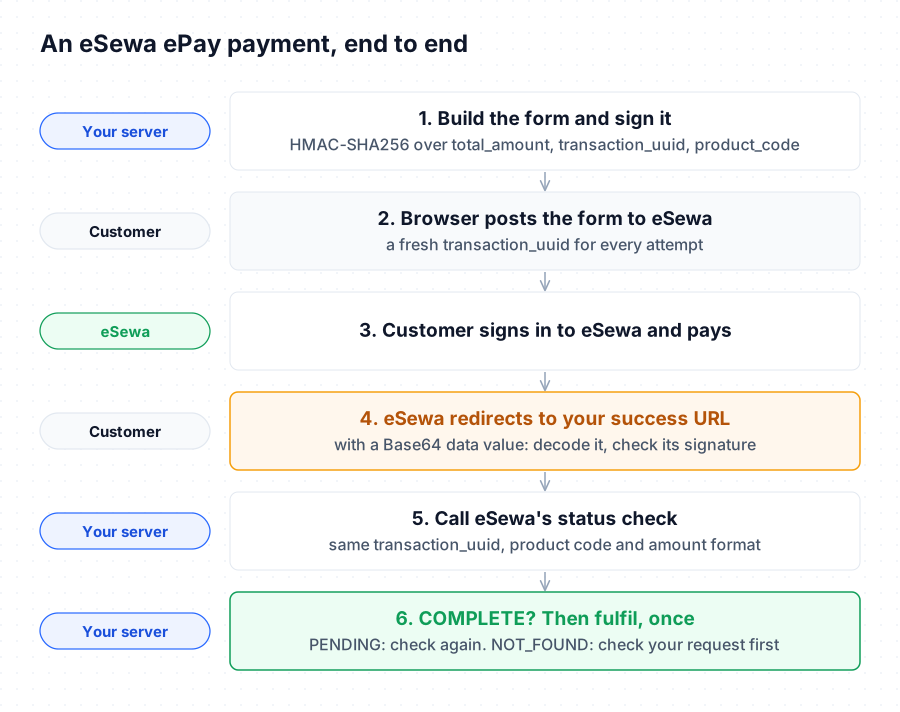
eSewa needs the customer's browser to post a signed form to eSewa. So your server signs the fields, and the browser submits them.
Sign the form on the server
// app/api/pay/esewa/route.ts
import { createHmac, randomUUID } from "node:crypto";

export async function POST(req: Request) {
  const { orderId } = await req.json();
  const order = await db.orders.findPendingFor(
    orderId,
    await currentUserId(),
  );
  if (!order)
    return Response.json({ error: "Order not found" }, { status: 404 });

  // new for every attempt
  const uuid = `${order.id}-${randomUUID().slice(0, 8)}`;
  const total = (order.amountPaisa / 100).toFixed(2); // "100.00"
  await db.attempts.create({
    orderId: order.id,
    provider: "esewa",
    reference: uuid,
    amountPaisa: order.amountPaisa,
  });

  const code = process.env.ESEWA_PRODUCT_CODE!;
  const message = [
    `total_amount=${total}`,
    `transaction_uuid=${uuid}`,
    `product_code=${code}`,
  ].join(",");
  const signature = createHmac("sha256", process.env.ESEWA_SECRET_KEY!)
    .update(message)
    .digest("base64");

  return Response.json({
    action: `${process.env.ESEWA_BASE_URL}/api/epay/main/v2/form`,
    fields: {
      amount: total,
      tax_amount: "0",
      total_amount: total,
      transaction_uuid: uuid,
      product_code: code,
      product_service_charge: "0",
      product_delivery_charge: "0",
      success_url: `${process.env.APP_URL}/api/pay/esewa/return`,
      failure_url: `${process.env.APP_URL}/api/pay/esewa/return`,
      signed_field_names: "total_amount,transaction_uuid,product_code",
      signature,
    },
  });
}
Submit it from the browser
// a client component
"use client";

export function PayWithEsewa({ orderId }: { orderId: string }) {
  async function pay() {
    const res = await fetch("/api/pay/esewa", {
      method: "POST",
      body: JSON.stringify({ orderId }),
    });
    const { action, fields } = await res.json();

    const form = document.createElement("form");
    form.method = "POST";
    form.action = action;
    for (const [name, value] of Object.entries(
      fields as Record<string, string>,
    )) {
      const input = document.createElement("input");
      input.type = "hidden";
      input.name = name;
      input.value = value;
      form.appendChild(input);
    }
    document.body.appendChild(form);
    form.submit();
  }
  return <button onClick={pay}>Pay with eSewa</button>;
}
The signature is computed with your secret on the server; the browser only carries the finished fields.
Confirm the return
// app/api/pay/esewa/return/route.ts
import { createHmac, timingSafeEqual } from "node:crypto";

export async function GET(req: Request) {
  const encoded = new URL(req.url).searchParams.get("data");
  if (!encoded) return Response.redirect(`${process.env.APP_URL}/cart`);

  let data: Record<string, string>;
  try {
    data = JSON.parse(Buffer.from(encoded, "base64").toString("utf8"));
  } catch {
    return new Response("Bad response", { status: 400 });
  }
  if (!data || typeof data !== "object")
    return new Response("Bad response", { status: 400 });

  // 1. Check eSewa's signature on the response. Insist on the response's
  //    own signed field set, so signed *request* fields cannot be replayed.
  const RESPONSE_FIELDS = [
    "transaction_code",
    "status",
    "total_amount",
    "transaction_uuid",
    "product_code",
    "signed_field_names",
  ].join(",");
  if (data.signed_field_names !== RESPONSE_FIELDS)
    return new Response("Invalid response", { status: 400 });
  const message = RESPONSE_FIELDS.split(",")
    .map((f) => `${f}=${data[f] ?? ""}`)
    .join(",");
  const expected = Buffer.from(
    createHmac("sha256", process.env.ESEWA_SECRET_KEY!)
      .update(message)
      .digest("base64"),
  );
  const given = Buffer.from(String(data.signature ?? ""));
  if (expected.length !== given.length || !timingSafeEqual(expected, given)) {
    return new Response("Invalid signature", { status: 400 });
  }

  // 2. Load YOUR attempt by the uuid you stored.
  const attempt = await db.attempts.find("esewa", data.transaction_uuid);
  if (!attempt) return new Response("Unknown payment", { status: 404 });

  // 3. Ask eSewa, with the exact amount string this attempt sent.
  const qs = new URLSearchParams({
    product_code: process.env.ESEWA_PRODUCT_CODE!,
    total_amount: (attempt.amountPaisa / 100).toFixed(2),
    transaction_uuid: attempt.reference,
  });
  const status = await fetch(
    `${process.env.ESEWA_BASE_URL}/api/epay/transaction/status/?${qs}`,
    {
      signal: AbortSignal.timeout(20_000),
    },
  ).then((r) => r.json());

  // 4. Paid only if eSewa says COMPLETE for the amount this attempt asked for.
  const paidPaisa = Math.round(
    Number(String(status.total_amount ?? "").replace(/,/g, "")) * 100,
  );
  if (status.status === "COMPLETE" && paidPaisa === attempt.amountPaisa) {
    await db.orders.markPaidOnce(
      attempt.orderId,
      attempt.amountPaisa,
      "esewa",
      status.ref_id,
    );
  }
  return Response.redirect(
    `${process.env.APP_URL}/orders/${attempt.orderId}`,
  );
}
Khalti in Next.js
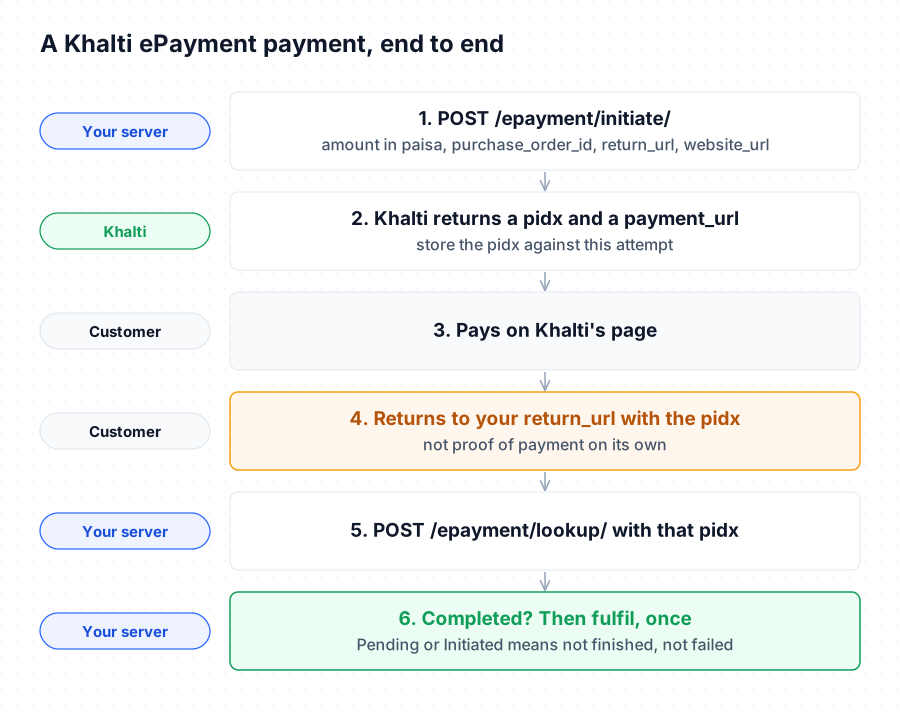
Khalti never needs the browser to sign anything: your server starts the payment and redirects.
// app/api/pay/khalti/route.ts
import { randomUUID } from "node:crypto";

const KHALTI = process.env.KHALTI_BASE_URL!;
const auth = { Authorization: `Key ${process.env.KHALTI_SECRET_KEY}` };

export async function POST(req: Request) {
  const { orderId } = await req.json();
  const order = await db.orders.findPendingFor(
    orderId,
    await currentUserId(),
  );
  if (!order)
    return Response.json({ error: "Order not found" }, { status: 404 });

  const res = await fetch(`${KHALTI}/epayment/initiate/`, {
    method: "POST",
    headers: { ...auth, "Content-Type": "application/json" },
    body: JSON.stringify({
      return_url: `${process.env.APP_URL}/api/pay/khalti/return`,
      website_url: process.env.APP_URL, // required, never blank
      amount: order.amountPaisa, // paisa
      purchase_order_id: `${order.id}-${randomUUID().slice(0, 8)}`,
      purchase_order_name: `Order ${order.id}`,
    }),
    signal: AbortSignal.timeout(20_000),
  });
  if (!res.ok)
    return Response.json(
      { error: "Khalti did not start the payment" },
      { status: 502 },
    );

  const { pidx, payment_url } = await res.json();
  await db.attempts.create({
    orderId: order.id,
    provider: "khalti",
    reference: pidx,
    amountPaisa: order.amountPaisa,
  });
  // the client sets window.location to this
  return Response.json({ paymentUrl: payment_url });
}
// app/api/pay/khalti/return/route.ts
export async function GET(req: Request) {
  const pidx = new URL(req.url).searchParams.get("pidx");
  // only a pidx YOU issued
  const attempt = pidx ? await db.attempts.find("khalti", pidx) : null;
  if (!attempt) return new Response("Unknown payment", { status: 404 });

  const lookup = await fetch(
    `${process.env.KHALTI_BASE_URL}/epayment/lookup/`,
    {
      method: "POST",
      headers: {
        Authorization: `Key ${process.env.KHALTI_SECRET_KEY}`,
        "Content-Type": "application/json",
      },
      body: JSON.stringify({ pidx: attempt.reference }),
      signal: AbortSignal.timeout(20_000),
    },
  ).then((r) => r.json());

  const paid =
    lookup.status === "Completed" &&
    !lookup.refunded &&
    lookup.total_amount === attempt.amountPaisa;
  if (paid)
    await db.orders.markPaidOnce(
      attempt.orderId,
      attempt.amountPaisa,
      "khalti",
      lookup.transaction_id,
    );

  return Response.redirect(
    `${process.env.APP_URL}/orders/${attempt.orderId}`,
  );
}
If Khalti's answer to the initiate call never arrives, the customer never receives a payment link, so nothing can be paid on that attempt; starting again is safe. Pending and Initiated are not failures: leave the order pending and look it up again later. If the lookup itself fails, the customer may still have paid. Every status is explained in the Khalti API integration guide.
Plain React with an Express API
The same logic works in Express, adapted to Express's request and response objects: read JSON bodies with express.json() (and the webhook's raw body with express.raw()), build absolute URLs from your own APP_URL, and answer with res.json() and res.redirect() instead of returning a Response. Keep the secrets in the API's environment and call the API from your React app. The React side only ever receives the eSewa form fields or the Khalti payment_url.
What is still missing
The code above has no answer for a customer who pays and closes the browser before the return page loads. You need a scheduled job that looks up every attempt not yet confirmed or ruled out, even after its order is paid, so a second payment from an old attempt is caught and refunded. Refunds, Fonepay's QR flow and one view of all payments are separate work again.
The shorter path: one SDK for eSewa, Khalti and Fonepay
With PayBridgeNP, you connect your own eSewa, Khalti and Fonepay merchant accounts once and use one API:
npm install @paybridge-np/sdk
// app/api/checkout/route.ts
import { PayBridgeNP } from "@paybridge-np/sdk";

const paybridgenp = new PayBridgeNP({
  apiKey: process.env.PAYBRIDGENP_API_KEY!,
}); // sk_test_... in sandbox

export async function POST(req: Request) {
  const { orderId } = await req.json();
  const order = await db.orders.findPendingFor(
    orderId,
    await currentUserId(),
  );
  if (!order)
    return Response.json({ error: "Order not found" }, { status: 404 });

  // Record the attempt BEFORE creating the session, with its own idempotency
  // key, so a timeout and retry returns the same session, not a second one.
  // findOrCreateOpen reuses an open attempt only for the same amount, inside
  // one transaction that locks the order row: two taps, one attempt.
  const attempt = await db.attempts.findOrCreateOpen(
    order.id,
    "paybridgenp",
    order.amountPaisa,
  );

  const session = await paybridgenp.checkout.create(
    {
      amount: attempt.amountPaisa,
      currency: "NPR",
      returnUrl: `${process.env.APP_URL}/orders/${order.id}`,
      cancelUrl: `${process.env.APP_URL}/cart`,
      metadata: { orderId: order.id },
    },
    attempt.idempotencyKey,
  );

  // The session ID is the link between this order and the webhook.
  await db.attempts.setReference(attempt.id, session.id);
  return Response.json({ checkoutUrl: session.checkout_url });
}
// app/api/webhooks/paybridgenp/route.ts
import { PayBridgeNP } from "@paybridge-np/sdk";

type PaymentSucceeded = {
  id: string;
  amount: number;
  currency: string;
  session_id: string;
  provider_ref?: string;
};
// true only with an sk_live_ key
const LIVE = process.env.PAYBRIDGENP_LIVE === "true";

export async function POST(req: Request) {
  const body = await req.text(); // the raw body, before any JSON parsing
  let event;
  try {
    event = await PayBridgeNP.webhooks.constructEvent<PaymentSucceeded>(
      body,
      req.headers.get("x-paybridgenp-signature"),
      process.env.PAYBRIDGENP_WEBHOOK_SECRET!,
    );
  } catch {
    return Response.json({ error: "Invalid signature" }, { status: 400 });
  }

  // A sandbox event must never mark a real order paid, and the reverse.
  if (event.livemode !== LIVE)
    return Response.json({ ignored: "wrong mode" });

  if (event.type === "payment.succeeded") {
    const attempt = await db.attempts.find(
      "paybridgenp",
      event.data.session_id,
    );
    if (
      attempt &&
      event.data.amount === attempt.amountPaisa &&
      event.data.currency === "NPR"
    ) {
      await db.orders.markPaidOnce(
        attempt.orderId,
        event.data.amount,
        "paybridgenp",
        event.data.provider_ref ?? null,
      );
    }
  }
  return Response.json({ received: true });
}
The customer picks eSewa, Khalti or Fonepay on a hosted page, and you get one signed payment.succeeded webhook whichever they chose. The signature check rejects anything not signed with your webhook secret, and messages more than five minutes old. The same event can still arrive twice, for example on a retried delivery, which is why the handler finds the attempt by the session ID you stored and marks the order paid only through markPaidOnce. Sandbox keys are free on every plan, eSewa and Khalti work in test mode without provider keys of your own, and payments settle straight into your own merchant accounts. PayBridgeNP never holds the money.
Next Steps
- The provider details: eSewa API integration and Khalti API integration.
- On PHP instead? eSewa and Khalti in Laravel.
- Why webhooks, not redirects: verify payments with webhooks.
- Get sandbox keys in the PayBridgeNP dashboard.