
A customer taps "Pay" on a slow mobile connection. Nothing seems to happen, so they tap again. Your server times out talking to the payment API and retries. The return page loads twice. Each of these is ordinary, and each one, handled carelessly, ends with two payments for one order, or one payment fulfilled twice. The fix is not one trick but three habits, and the word for the first one is idempotency.
Last verified: 25 October 2026, against the PayBridgeNP idempotency guide and the TypeScript, PHP and Python SDKs.
Where duplicates come from
| Where | What goes wrong | The fix |
|---|---|---|
| Starting the payment | A double tap or a retry after a timeout creates two payment sessions, and the customer may pay both | An idempotency key on the request |
| Confirming the payment | The return page and the webhook both confirm, or the same webhook arrives twice | Mark the order paid with an update that only succeeds once |
| Retrying a payment | A new attempt overwrites the old one, which then completes with nowhere to go | One row per attempt, never overwritten |
1. Idempotency keys: make retries safe
An idempotency key is a unique string you send with a request that changes something. The server remembers the key and its answer. If the same key arrives again, the server returns the first answer instead of doing the work twice.
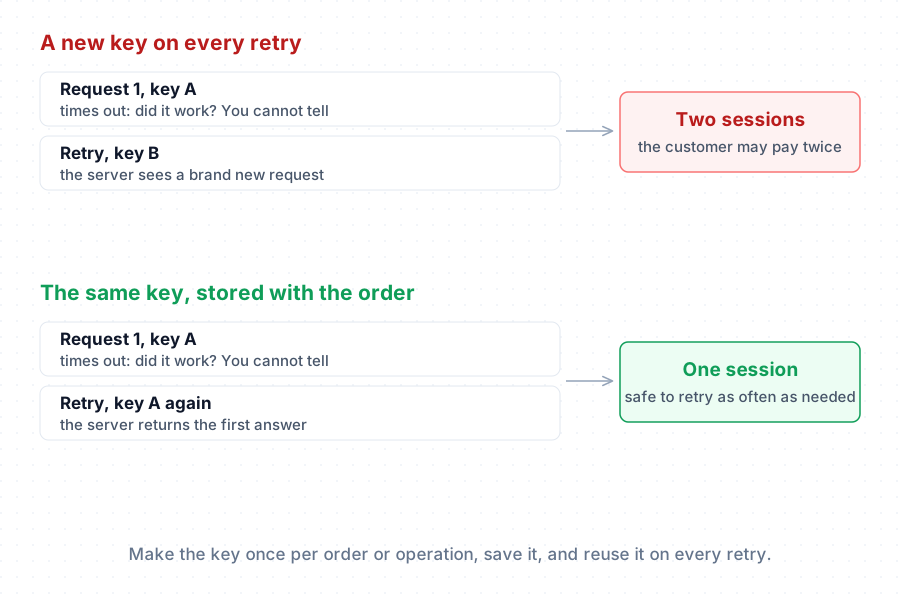
The rule that makes it work: create the key once per operation, store it, and reuse it on every retry of that operation. A fresh key on each retry defeats the point.
The PayBridgeNP API accepts an Idempotency-Key header on its create endpoints, including checkout sessions, refunds, payment links and Fonepay QRs. Keys are scoped to your project and to live or sandbox mode, and answers are kept for at least 24 hours. The SDKs take the key as the last argument:
// TypeScript: generate once, store with the order, reuse on retry.
// The UPDATE only writes if no key is stored yet, so two requests racing here
// cannot store different keys: both read back the one that won.
await db.query(
  "UPDATE orders SET checkout_key = $2 WHERE id = $1 AND checkout_key IS NULL",
  [order.id, crypto.randomUUID()],
);
const { checkout_key: key } = await db.one(
  "SELECT checkout_key FROM orders WHERE id = $1",
  [order.id],
);

const session = await paybridgenp.checkout.create(
  {
    amount: order.amountPaisa,
    returnUrl: `${APP_URL}/orders/${order.id}`,
    metadata: { orderId: order.id },
  },
  key,
);
// PHP: the key is the final argument
$session = $paybridgenp->checkout->create([
    'amount'    => $order->total_paisa,
    'returnUrl' => route('orders.show', $order),
], $order->checkout_key);
# Python: a keyword-only argument
session = paybridgenp.checkout.create(
    {"amount": order.total_paisa, "returnUrl": return_url},
    idempotency_key=order.checkout_key,
)
Three details matter:
- One key per operation, not per order forever. If the customer later asks for a new payment for the same order, for example after the first session expired, that is a new operation and needs a new key.
- Two requests with the same key at the same moment: the second waits briefly for the first and gets its answer. If the first is still running after that, the second gets a
409withidempotency_conflict. Wait and retry with the same key. - A timeout means "unknown", not "failed". Retry with the same key, or look the result up. Never switch to a new key just because you did not get an answer.
2. Mark paid once
Confirmations arrive more than once by design. The customer's return page and a webhook can both confirm the same payment, and a webhook delivery is retried several times if your server does not answer with success. Your code has to treat the second confirmation as a no-op.
Do not read the order, check status === 'pending', then save. Two confirmations a few milliseconds apart will both pass the check. Instead, make the database do it in one statement:
UPDATE orders
SET status = 'paid', paid_via = $2, provider_ref = $3
-- $4: the amount actually paid
WHERE id = $1 AND status = 'pending' AND total_paisa = $4;
Then look at how many rows changed. One means this confirmation marked it paid: send the receipt, release the goods. Zero means this confirmation did not mark it paid, and there are several reasons why: the same payment already did, the order was cancelled, the amount does not match, or there is no such pending order. Never throw the payment away. Record it against its attempt, and unless it is the same payment that already marked the order paid, flag it for someone to check: a wrong amount, or a second payment that may need refunding. The Laravel, Node.js and Django guides each show the one-statement update in their own framework; add the zero-row handling above to whichever you use.
3. One row per payment attempt
eSewa expects a unique transaction_uuid for every attempt. Khalti gives each attempt its own pidx. Store that ID per attempt, not on the order itself, or a second attempt overwrites the first. If the customer then completes the first attempt, your code can no longer find which order it belonged to.
Keep a small table instead: one row per attempt, holding the order, the provider, the attempt's reference and the amount it asked for. Look payments up by that reference. A customer can retry as often as they like, and every attempt still leads back to its order.
What not to use as a key
- The order ID on its own. It is the same for every retry and every new attempt, so a customer who needs a fresh payment session would keep getting the old, expired one.
- A timestamp. Two retries in the same second collide, and two retries a second apart do not.
- Anything generated in the browser for a server-side operation. Generate keys on your server, where you can store them.
How PayBridgeNP handles the provider side
With PayBridgeNP, the provider-specific parts are handled for you: a new eSewa transaction_uuid for each attempt, the Khalti pidx stored and looked up, and Fonepay QRs tied to their session. Your code sends one idempotency key when it creates a checkout, and marks the order paid once when the signed webhook arrives. Payments settle straight into your own merchant accounts.
Next Steps
- In your stack: Laravel, Node.js and Next.js.
- Confirm payments safely: verify payments with webhooks.
- The full reference: the idempotency guide.