
eSewa has the widest wallet reach in Nepal, which makes it the first provider most businesses want to accept. It is also the one where the merchant information is most scattered: the login lives on one portal, registration guidance on the eSewa blog, developer docs on a third site, test credentials on a fourth page, and the fees are not published at all.
Here is the whole picture in one place.
Last verified: 30 August 2026, including eSewa's 11 August update to the merchant documents.
Quick answers
| Question | Answer |
|---|---|
| Merchant login | merchant.esewa.com.np, eSewa's merchant portal |
| Where to register | The same portal, or through eSewa's merchant team; see registering |
| Developer docs | developer.esewa.com.np |
| Test credentials | Published on the test credentials page of the developer docs |
| Which API to use | Intent is eSewa's recommended integration; ePay is the classic web redirect |
| Merchant commission | Not published. Set in your merchant agreement; merchants report about 2% plus a one-time setup, often negotiated |
| What customers pay | Nothing extra at checkout (their tariffs cover wallet services, not merchant payments) |
Registering as an eSewa merchant
Registration goes through the merchant portal at merchant.esewa.com.np, which doubles as your merchant login later, or through eSewa's merchant team by email or phone. Expect standard Nepali merchant onboarding:
- Business registration certificate and PAN or VAT
- Bank account details for settlement
- Contact person, phone, email
- Your website or app URL for online integrations
What eSewa published on 11 August 2026. Its documents guide lists sole proprietorships as an eligible entity type, with a lighter document set for small businesses under Rs 1 lakh (Rs 100,000) of transactions in a fiscal year and the standard set above that. Private limited companies are asked for the PAN or VAT certificate and the latest tax clearance certificate, among other documents. If you assumed a registered company was required, read that guide before you decide.
The merchant agreement you sign sets your commission rate. eSewa does not publish merchant rates anywhere; the number comes from your paperwork. Approval time depends on your documents and business type. Developers on r/technepal report that the slow part is the wait for a reply after submitting the form (May 2026, July 2026) and that test credentials sometimes arrive broken (April 2026), so ask for the sandbox pair up front and test it the day it lands.
eSewa's integration options
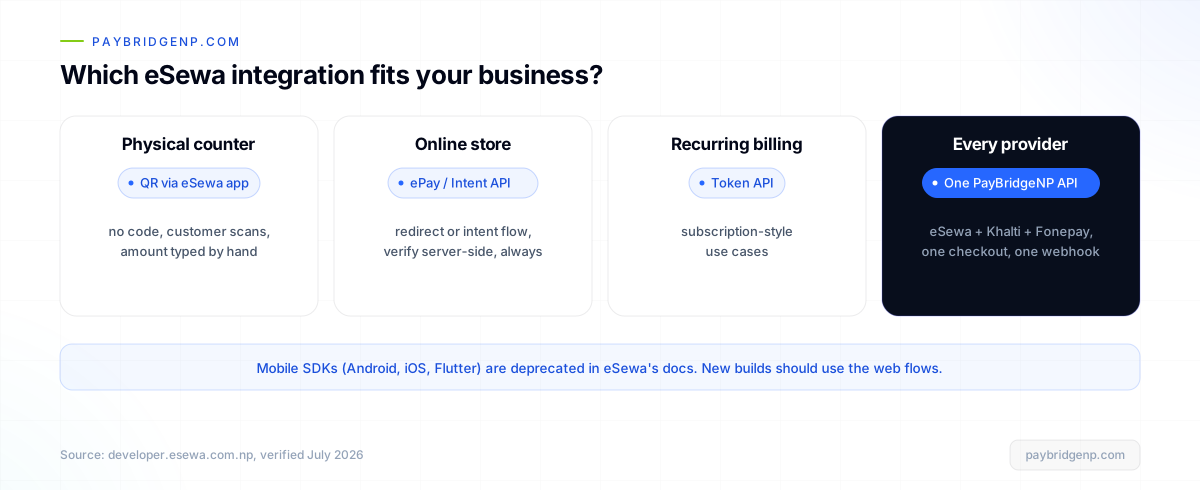
From eSewa's developer docs, the current menu looks like this:
- ePay is the classic web integration: redirect the customer to eSewa, they pay, eSewa redirects back, and you verify the result server-side.
- Intent is the integration eSewa now recommends, built around signature generation and payment initialization.
- Plugins exist for WooCommerce, PrestaShop and Magento.
- Token API covers recurring payment use cases.
- Mobile SDKs (Android, iOS, Flutter) are deprecated and no longer maintained. If you are starting today, do not build on them; use the web flows.
Whichever you choose, one rule keeps you out of trouble: never trust the redirect alone. Confirm every payment with a server-side status check before releasing goods. We wrote up why in verify payments with webhooks, not the redirect.
The sandbox: test credentials
eSewa publishes shared test credentials in the developer docs, so you can run the full payment flow in sandbox before you have a live agreement. Search brought you here if you were looking for "esewa test credentials": they live on the test credentials page at developer.esewa.com.np, including a test merchant code and test wallet login for the sandbox environment.
Test the whole loop: initiate, pay with the test wallet, land back on your success URL, and verify server-side. Then repeat for failure and cancellation. The sandbox is where those edge cases are cheap.
What does the eSewa API cost?
Same honest answer as the other providers: eSewa does not publish API or gateway pricing. The API itself has no listed price tag; the commercial cost is the per-transaction commission in your merchant agreement. Your customers pay nothing extra at checkout, since eSewa's published tariffs apply to wallet services like transfers and withdrawals, not to paying merchants.
What merchants report, so you know the shape before you negotiate: a one-time setup or API fee of roughly Rs 20,000 to 30,000 and a commission of about 2% per transaction, and that the figures are negotiated rather than fixed (r/technepal, August 2026). Treat these as other people's quotes, not a tariff; yours is whatever your agreement says.
The other cost is engineering time: signatures, redirects, verification, refund handling (manual with eSewa), and keeping up when docs and API behaviour drift, which with eSewa they sometimes do.
The faster path
If eSewa is the only thing you will ever accept, direct integration is fine. Most Nepali businesses end up wanting eSewa, Khalti, and Fonepay together, because each reaches customers the others do not, and that means three integrations with three different verification models.
PayBridgeNP collapses that to one. You bring your own eSewa merchant agreement, connect it once, and get all three providers in a single hosted checkout with one API, signed webhooks and one dashboard. Flat plan fee, nothing per transaction, and settlement stays exactly where it belongs: your own eSewa merchant account, at your own agreed rate. The eSewa page has the details, and sandbox keys are free on every plan.
Frequently asked questions
Where is the eSewa merchant login? merchant.esewa.com.np. It is eSewa's own portal, the same one you register through. If a password reset is not arriving, merchants report that eSewa's support handles it by hand (r/technepal, May 2026).
Can a sole proprietor or a very small business become an eSewa merchant? eSewa's documents guide of 11 August 2026 lists sole proprietorships as eligible, with a lighter document set for businesses under Rs 1 lakh of transactions in a fiscal year.
Are there free eSewa test credentials? Yes, eSewa publishes shared sandbox credentials on its test credentials page so you can integrate and test before going live.
How much does the eSewa API cost? There is no published API price. Your cost is the commission in your merchant agreement plus the engineering time to build and maintain the integration.
Does eSewa have a WooCommerce plugin? Yes, eSewa lists a WooCommerce plugin, along with PrestaShop and Magento. If you want eSewa, Khalti, and Fonepay in WooCommerce together, PayBridgeNP's plugin does all three.
Are the eSewa mobile SDKs still supported? The Android, iOS and Flutter SDKs are marked deprecated in eSewa's docs. Use the web-based flows for new builds.
Next Steps
- Accept eSewa through PayBridgeNP: how it works.
- Once you are live, ask about your payments in plain words: Claude or ChatGPT on your eSewa, Khalti, and Fonepay payments.
- Building direct? Bookmark verify payments the right way first.
- Compare your options: PayBridgeNP vs direct integration.
- Start free in the PayBridgeNP dashboard.
Sources
- eSewa developer docs, integration options and test credentials, verified August 2026.
- Documents required for eSewa merchant and API integration, eSewa blog, 11 August 2026.
- r/technepal, need advice on integrating Nepali payment gateways, merchant-reported fees, August 2026.
- eSewa merchant portal for registration and login.
- eSewa tariffs for published consumer-side charges.