
Search for eSewa charges and you get scattered answers: a forum thread from three years ago, a screenshot of an old notice, a guess in a comment section. The actual numbers live in eSewa's official tariff schedule, and they change more often than people realise.
This guide puts the whole schedule in one place, in plain language, and answers the question the official page skips: who actually pays each fee, the customer or the business?
Last verified: 22 October 2026, against eSewa's tariff page (their schedule is marked applicable from Bhadra 3, 2083). Most charges are unchanged from our July check; NEA electricity bills moved to a tiered charge, shown below. eSewa adds 13% VAT to these service charges where it applies, so a Rs 10 charge can show as slightly more. Charges change, so treat eSewa's page as the final word if you are reading this much later.
The quick answer
The charges people search for most:
| Service | Charge |
|---|---|
| Sending money to another eSewa user | Free below Rs 100. Above Rs 100, free 3 times a day and 30 times a month, then Rs 10 per transaction |
| Bank transfer (wallet to bank) | Rs 10 per transaction (Rs 100 to Rs 200,000) |
| ATM withdrawal | Rs 15 flat |
| Cash in at an agent | Rs 5 to Rs 25 depending on amount |
| Cash out | Disabled for now |
| Paying an online store or shop QR | Free for the customer. The business pays a commission instead |
That last row is the one this blog cares most about, and we will come back to it.
Send money
Person-to-person transfers inside eSewa:
- Below Rs 100: free, always.
- Rs 100 and above: free up to 3 transactions a day and 30 a month.
- Beyond those limits: Rs 10 per transaction.
For normal personal use most people never hit the caps. If you are running a business through personal send-money transfers, you will hit them quickly, and you are also missing payment records, which matters at tax time. That is what merchant tools are for.
Bank transfer (bank withdrawal)
Moving money from your eSewa wallet to a bank account costs Rs 10 per transaction for amounts from Rs 100 up to Rs 200,000.
Two limits worth knowing, straight from the tariff page (the full per-day and per-month limits are in eSewa limits per day and month):
- Transfers to your own saved bank account: up to Rs 100,000 per transaction.
- Transfers to other accounts: up to Rs 50,000.
ATM withdrawal
Withdrawing cash from an ATM using eSewa costs a flat Rs 15 per transaction.
Cash in and cash out
Loading cash into your wallet through an agent (cash in) is charged on a slab, and the charge is deducted from the amount you load:
| Amount | Charge |
|---|---|
| Up to Rs 5,000 | Rs 5 |
| Rs 5,001 to Rs 15,000 | Rs 15 |
| Rs 15,001 to Rs 25,000 | Rs 25 |
Cash out through agents is disabled at the time of writing. Loading your wallet from a linked bank account remains the free route.
Loading via card is different: a 1.75% processing fee applies, with limits of Rs 10,000 per transaction, Rs 25,000 per day, and Rs 50,000 per month.
Bill and service payments
Most day-to-day payments carry a small per-transaction charge. The common ones (13% VAT applies on top where eSewa marks the charge as exclusive of VAT):
| Payment | Charge |
|---|---|
| Education fees | Rs 10 |
| EMI payments | Rs 10 |
| Micro finance | Rs 10 |
| Credit card bill | Rs 10 plus VAT |
| CIT (pension scheme, loan repayment) | Rs 8 |
| Social Security Fund | Rs 8 |
| Health Insurance Board renewal | Rs 5 |
| Mero Share / DEMAT renewal | Rs 5 |
| Mutual fund | Rs 4 up to Rs 5,000, Rs 8 above |
| Broker payment | Rs 2 up to Rs 500, Rs 4 up to Rs 5,000, Rs 8 above |
Government payments run on their own slab:
| Amount | Charge |
|---|---|
| Up to Rs 5,000 | Rs 5 |
| Rs 5,001 to Rs 10,000 | Rs 8 |
| Rs 10,001 and above | Rs 10 |
The same slab applies to DOFE Welfare Fund payments.
Utilities vary by provider: NEA electricity is free up to Rs 500, then Rs 5 up to Rs 5,000, Rs 8 up to Rs 10,000 and Rs 10 above that (from Bhadra 3, 2083). Kathmandu Upatyaka Khanepani is free up to Rs 500 then Rs 5, community electricity is Rs 10 including VAT, and other khanepani providers have their own small slabs. The full tariff page lists every provider individually.
eScrow
eSewa's escrow service works between KYC-verified users (Rs 100 to Rs 25,000 per transfer) and charges Rs 10 per transaction, paid by the receiver, with a Rs 50 dispute handling fee that eSewa charges to the sender or the receiver if a dispute is raised.
The fee nobody lists: what businesses pay
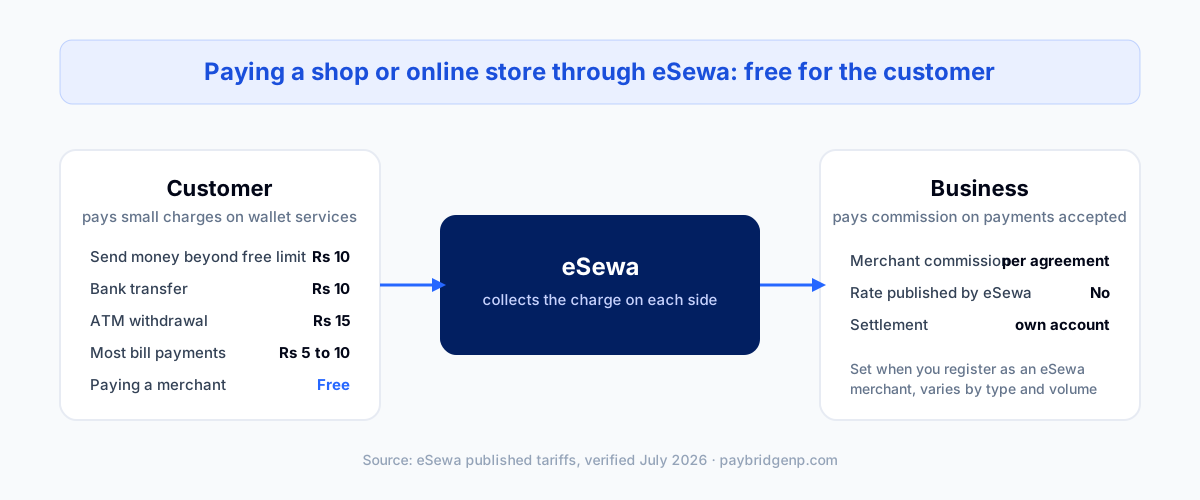
Look back through everything above and notice what is missing: paying a business. Scanning a shop QR, checking out on an online store, paying for a service. None of it appears in eSewa's tariff schedule, because for the customer it is free.
The cost exists, it just sits on the other side. Businesses accepting eSewa pay a commission per transaction, set by their merchant agreement with eSewa. eSewa does not publish these rates, and they vary by business type and volume. If you are registering as a merchant, the rate is part of the paperwork you sign.
For the shape of it: merchants on r/technepal report a one-time setup or API fee of roughly Rs 20,000 to 30,000 and about 2% per transaction, negotiated rather than fixed (August 2026 thread). Those are other people's quotes, not eSewa's list. Put your own rate into the fee calculator to see what a month of sales costs across eSewa, Khalti, and Fonepay, and read how to register as an eSewa merchant for the documents and eSewa's 11 August 2026 documents guide.
Two practical points for business owners:
- The commission is between you and eSewa. Any honest payment gateway sitting on top does not change it, because the money still settles under your own eSewa merchant agreement.
- PayBridgeNP charges a flat monthly plan fee and nothing per transaction, and never touches the funds. So your eSewa cost stays whatever eSewa agreed with you. Our pricing page has the plan numbers.
Frequently asked questions
Is eSewa free to use? Creating an account and paying merchants is free. Wallet services carry small charges: Rs 10 to send money beyond the free limits, Rs 10 for bank transfers, Rs 15 for ATM withdrawals, and Rs 5 to Rs 10 on most bill payments.
What is the eSewa charge for bank transfer? Rs 10 per transaction, for transfers from Rs 100 up to Rs 200,000. Your own saved bank account allows up to Rs 100,000 per transaction, other accounts up to Rs 50,000.
Does eSewa charge for receiving money? No charge for receiving a personal transfer. Businesses receiving customer payments pay commission per their merchant agreement.
Why did I get charged for sending money? You crossed the free allowance: 3 free sends a day and 30 a month for amounts of Rs 100 or more. After that each send costs Rs 10.
Do customers pay anything extra when paying my store through eSewa? No. Checkout payments are free for the customer. You pay the merchant commission, and if you use PayBridgeNP on top, we add no per-transaction fee of our own.
Next Steps
- Accepting eSewa on your site? See how eSewa integration works with PayBridgeNP.
- Compare wallets before you choose: eSewa vs Khalti vs Fonepay.
- Check if eSewa is having issues right now: live eSewa status.
- Start free in the PayBridgeNP dashboard.
Sources
- eSewa Tariffs, official schedule, effective Ashoj 2, 2082. All customer-side numbers above come from this page, verified July 2026.