
If you want customers to pay you through Khalti, you need a merchant account. The signup itself is free and starts online, but the path is confusing because "Khalti merchant" means two different products depending on who you ask.
This guide covers both, with the actual URLs, what to prepare, and how the test environment fits in.
First: which Khalti merchant are you?
- Khalti Pasal is for physical shops: a QR on your counter, payments into your Khalti merchant wallet. Registration at khalti.com/pasal, support at pasalsupport@khalti.com.
- Khalti Payment Gateway is for online businesses: checkout on your website or app, powered by the Khalti ePayment API (KPG). This is the one the rest of this guide focuses on.
If you sell both offline and online you can run both, but they are separate registrations.
Where to sign up
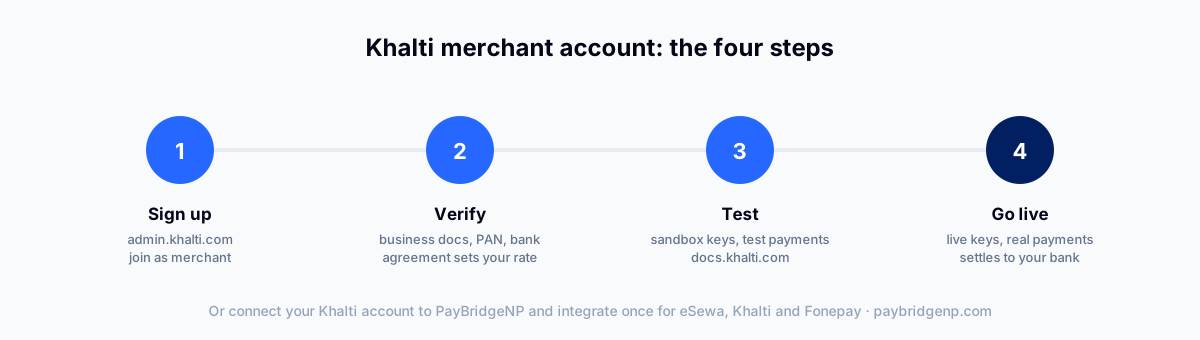
The merchant signup lives at admin.khalti.com/#/join/merchant. The same admin panel is later your dashboard login, so bookmark it once and you have answered the "khalti merchant login" question too.
What to prepare
Khalti does not publish a strict document checklist on the signup page, but merchant onboarding in Nepal follows a standard shape. Have these ready and the process moves quickly:
- Business registration certificate (or your details, if registering as an individual)
- PAN number
- A bank account for settlement
- Contact person, phone and email
- Your website or app URL, if you are integrating online checkout
Khalti's merchant team reviews the application, and your commission rate is set in the merchant agreement at this stage. Khalti does not publish per-merchant rates, so treat any number you read in a forum as a guess. Their published consumer-side charges live at khalti.com/info/charges.
For onboarding help, Khalti lists merchant support at merchant@khalti.com and 9801165557 (phone, Viber or WhatsApp).
Test before you go live
Khalti provides a test environment so you can integrate and pay with test credentials before real money moves. The Khalti API integration guide walks through the initiate and lookup calls step by step. The Khalti docs walk through creating a test merchant and using the sandbox keys with the ePayment API. Do not skip this step: verify your success flow, your failure flow, and your server-side lookup before switching to live keys.
If you searched "khalti merchant test", this is what you were looking for: a separate test merchant account, separate keys, no real money.
What your customers can pay with
One underrated fact about the Khalti gateway: it is not only for wallet users. Through Khalti checkout your customers can pay with:
- Khalti wallet balance
- eBanking from partner banks
- Mobile banking
- ConnectIPS
- SCT and VISA cards
So a single Khalti integration already covers several payment habits. The gap is the biggest wallet in the country, eSewa, and the bank-app QR network, Fonepay. Which is where most merchants end up wanting more than one provider.
The dashboard
After approval you work from the Khalti merchant dashboard at admin.khalti.com: transactions in real time, refunds (Khalti supports refunds through the dashboard and API), filtered reports and downloads, and balance updates as payments land.
The faster path: one integration for Khalti and everything else
Here is the honest math. Registering with Khalti is step one. If you also want eSewa and Fonepay, that is three registrations, three APIs, three webhook formats, three dashboards. The registrations you cannot skip, because each provider settles to you under your own agreement, and that is a good thing: your money never sits with a middleman.
The integrations you can skip. With PayBridgeNP you connect your own provider accounts once, then integrate a single API, one checkout, one webhook format, one dashboard for all providers. Your Khalti commission stays whatever Khalti agreed with you, we charge a flat plan fee with nothing per transaction, and funds settle straight to your accounts as always. The Khalti integration guide shows the setup.
Frequently asked questions
Where is the Khalti merchant login? admin.khalti.com. The same panel handles signup and the day-to-day dashboard.
How much does a Khalti merchant account cost? Signing up is free. Khalti earns a commission per transaction, set in your merchant agreement.
Is there a Khalti merchant test account? Yes. The Khalti docs cover the test environment and sandbox keys so you can integrate before going live.
How long does approval take? It depends on your documents and business type. Straightforward registrations with complete documents typically clear within a few working days. merchant@khalti.com is the channel to chase status.
Can I accept Khalti without building an integration? Yes. Through PayBridgeNP you can send payment links or use hosted checkout with Khalti enabled, no code required.
Next Steps
- See how Khalti works with PayBridgeNP alongside eSewa and Fonepay.
- Compare providers before committing: eSewa vs Khalti vs Fonepay.
- Integrating yourself? Read the developer guide to Nepal payment APIs.
- Start free in the PayBridgeNP dashboard.
Sources
- Khalti merchant page and merchant signup, verified July 2026.
- Khalti ePayment docs for the gateway, test environment and supported payment sources.
- Khalti service charges for published consumer-side fees.