
A huge share of Nepali online selling never touches a website. The shop is an Instagram page, the catalogue is the feed, the negotiation happens in DMs, and the payment is where everything gets awkward: "Send to this eSewa number and send me the screenshot."
You do not need a website to fix this. You need a payment method that confirms itself. Here are the real options, from most manual to most professional, and when each one is enough.
The screenshot problem
The standard chat-commerce flow runs on trust in both directions. The buyer trusts an unknown seller with an advance; the seller trusts a screenshot that takes thirty seconds to fake. Every experienced seller has a story: the edited screenshot, the "payment is processing" that never lands, the hour wasted cross-checking a wallet statement before dispatching a Rs 2,000 order.
Every option below is judged on one question: does the seller get real confirmation without asking for a screenshot?
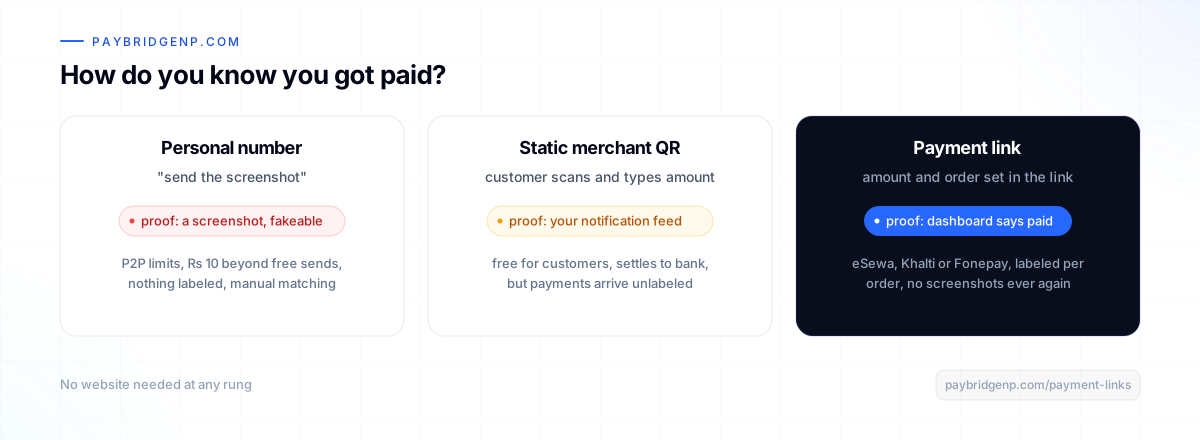
Option 1: personal wallet transfers (where everyone starts)
Sharing your eSewa or Khalti number in chat works, which is why everyone does it. But look at the costs:
- Confirmation is the screenshot, hence the whole problem above.
- Personal wallet limits apply: caps per transaction, per day and per month, and a Rs 10 charge once the sender passes the free allowance.
- Nothing is labeled. Matching "who paid what for which order" at month end is your unpaid second job.
- It scales embarrassingly. Serious buyers hesitate to send an advance to a bare personal number.
Fine for a first month. A tax on every month after.
Option 2: a static QR (better, still manual)
A Fonepay merchant QR or a wallet merchant QR is a real upgrade: customers pay from any banking app or wallet, it costs them nothing extra, and money lands in your account. For in-person handovers it is excellent.
For chat selling, the gaps remain: the customer types the amount by hand, payments arrive as a stream of unlabeled credits, and you still check your notifications to confirm each one. The screenshot ritual survives, just with better plumbing.
Option 3: payment links (the self-confirming one)
A payment link is a URL you create in a dashboard with the amount and description already set: "Sajilo Boutique, Order #142, Rs 2,499". You paste it into the DM. The buyer taps and pays with eSewa, Khalti or Fonepay, their choice, on a branded checkout page.
What changes everything is what happens next: you get the confirmation, not a screenshot. The payment shows up in your dashboard, marked paid, tied to that link, the moment it happens. Dispatch without a second thought.
- No website, no code, no developer. If you can paste a link, you are done.
- Every payment is labeled, so reconciliation is reading a list.
- The branded page does quiet work on trust: buyers pay a checkout, not a stranger's number.
- Fixed price for everyone? One reusable link in your bio covers it. Custom order? A fresh link takes seconds.
This is the option built for exactly how chat commerce works, and it is what we would point almost every Instagram, Facebook and WhatsApp seller at. It costs nothing to try: link creation is on the free plan, and money settles to your own provider accounts, never through us.
Option 4: a payment button on one simple page
Somewhere between "no website" and "a real store" sits the one-page setup: a Linktree-style page or a single landing page for an event, a course, or a service. A payment button is one HTML snippet pasted into that page: "Register, Rs 500", "Book a consultation, Rs 2,000". No backend, and the same self-confirming checkout behind it.
When you finally do build the store
The day you outgrow DMs, nothing gets thrown away. The same account that made your links powers a full hosted checkout on Shopify, WooCommerce or a custom site, with the same providers and the same dashboard history. Choosing links today does not paint you into a corner; it is step one of the same system. The three-doors guide explains how they fit together.
Frequently asked questions
Can I really accept eSewa, Khalti, and Fonepay with no website? Yes. A payment link opens a hosted checkout page with all your enabled providers. The link works anywhere you can paste text.
Do I need a registered business? You can start collecting through payment links quickly, but proper provider merchant onboarding involves standard requirements (PAN, bank account). Small non-PAN merchants have options too, like Fonepay's non-PAN QR enrollment.
What does it cost? PayBridgeNP has a free plan with a monthly volume allowance and charges nothing per transaction. Provider-side commissions follow your own merchant agreements, same as any method.
How do I stop fake payment screenshots? Stop accepting screenshots as proof. With payment links the confirmation arrives in your dashboard from the payment itself. If it is not marked paid there, it is not paid.
Where does the money go? Straight to your own provider merchant accounts under your own agreements. PayBridgeNP routes and confirms the payment but never holds funds.
Next Steps
- Create your first payment link in under a minute.
- Selling from one page? Add a payment button.
- Understand your providers first: eSewa vs Khalti vs Fonepay.
- Start free in the PayBridgeNP dashboard.